 Look What I Have
Get the app
The Android app for the tablet. It is installed once, by whoever looks after the archive — she never has to do this.
Download
| Version | 0.1.0 (1) |
|---|---|
| File | lookwhatihave.apk |
| Size | 95.2 MB |
| Published | 16 September 2026 |
| Needs | Android 8.0 or newer, and a camera |
Most of that size is the on-device face detection, which is what lets the small camera window keep her framed without anything being sent anywhere.
Install it over the air
A hosted install page, which some Android builds find easier than a file: it handles the download and the "install from this source" prompt in one step.
The button above this card is the permanent one. This link is re-issued from time to time and the direct download never is, so if this page says the link has expired, use the direct download and it will work.
On the tablet itself
Point the tablet's camera at this and it will open this page on the tablet, where the download button is the same one.
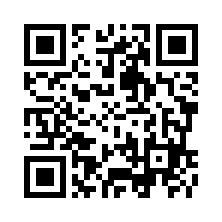
It opens this page rather than starting the download, so the checksum and the steps below are in front of you on the device you are installing onto.
Check what you downloaded
The file should have this SHA-256. If it does not, do not install it — download it again, and tell us.
19dc2e158418f8166ec0a59164e53a2d142764a10ec40e7dcf4c47032827ad13
On Windows, in PowerShell:
Get-FileHash .\lookwhatihave.apk -Algorithm SHA256On a Mac or Linux:
shasum -a 256 lookwhatihave.apkInstall it
This app is not on Google Play, so Android will ask you once whether you trust the app you are installing from — usually the browser or the Files app. That is the "install unknown apps" permission, and it is a one-off.
-
Open the downloaded file. Tap the download
notification, or find
lookwhatihave.apkin the Files app under Downloads and tap it. - Android will stop you the first time. It shows a message along the lines of "For your security, your phone is not allowed to install unknown apps from this source." Tap Settings on that message.
- Turn on the permission for that one app. The switch is called Allow from this source or Allow app installs. It applies only to the app you came from, not to the whole tablet.
- Go back and tap Install. Use the back gesture or button. The install screen returns and the button now works.
- Turn the permission off again if you would rather. It is under Settings › Apps › Special app access › Install unknown apps. The app you installed keeps working.
Samsung, Lenovo and Google all word these screens differently, and change them between Android versions. The five steps are always the same shape: open the file, Android objects, allow that one source, go back, install. If your screen says something else, look for those words rather than an exact match.
After it is installed
The app opens on a pairing screen and asks for the address of your archive and a pairing code. Both come from whoever set the archive up — Family setup has that half.
Once it is paired, hand the tablet over. There is nothing else to configure and she has no password to remember.
Google Play
Planned We intend to put the app on Google Play so that installing it is one tap and updates arrive on their own. It is not there yet, and until it is, the download on this page is the app.
Updates
There is no automatic update while the app is installed this way. When there is a new version, download it from this page and install it over the top — the tablet stays paired and nothing is lost.
Looking for something to watch stories on rather than record them? That is Viewers.